 Network Info
If you work in networking, sooner or later you will meet a MikroTik. It might be the router in a small ISP, the gateway of an office, or the box a friend keeps recommending because it is “cheap and powerful”. But what exactly is MikroTik, where did it come from, and why is it so popular?
This guide answers those questions from the beginning.
## What is MikroTik?
MikroTik is a company based in Riga, Latvia that makes networking hardware and software. People usually mean two things when they say “MikroTik”:
1. The company, which designs routers, switches, wireless devices and more.
2. The product, meaning the routers and the operating system that runs on them.
## A short history of MikroTik
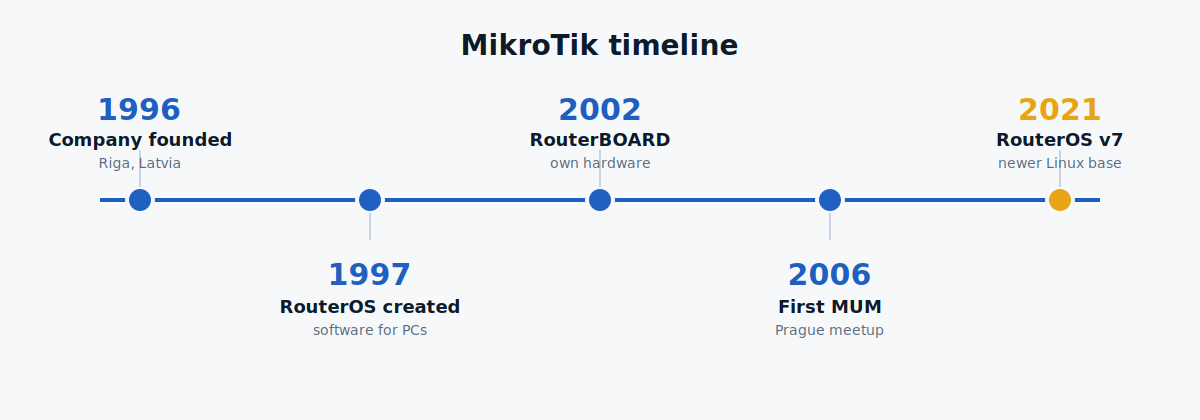
– 1996: The company is founded. MikroTik was established in Riga by John Tully and Arnis Rieksti . The early focus was software for routers and wireless internet providers (WISPs).
-1997: RouterOS is created. The team built RouterOS, a router operating system that turned an ordinary PC into a full router. The earliest versions were based on the Linux kernel.
– 2002: RouterBOARD is born. Instead of relying only on PCs, MikroTik started making its own small, low-power hardware, branded RouterBOARD, with RouterOS preinstalled.
– 2006: The first MikroTik User Meeting (MUM). MikroTik began holding community events where engineers share ideas. The first was held in Prague, and MUMs are now held around the world.
– 2021 onward: RouterOS v7. A major new version of RouterOS arrived with a newer Linux base and many improvements. Today MikroTik sells devices ranging from small home routers to carrier-grade equipment.
## Popular MikroTik product families
– hAP: small routers with Wi-Fi for homes and small offices
– RB (RouterBOARD): general-purpose wired routers
– CRS: Cloud Router Switches, for switching with some routing
– CCR: Cloud Core Routers, built for heavy traffic and ISPs
– Wireless products: outdoor radios and access points, such as the SXT, LHG and Cube lines
## Why do people use MikroTik?
1. Great value for the price
MikroTik devices usually cost much less than similar devices from the big enterprise brands. For a small ISP or a company on a tight budget, this matters a lot.
2. Many features in one device
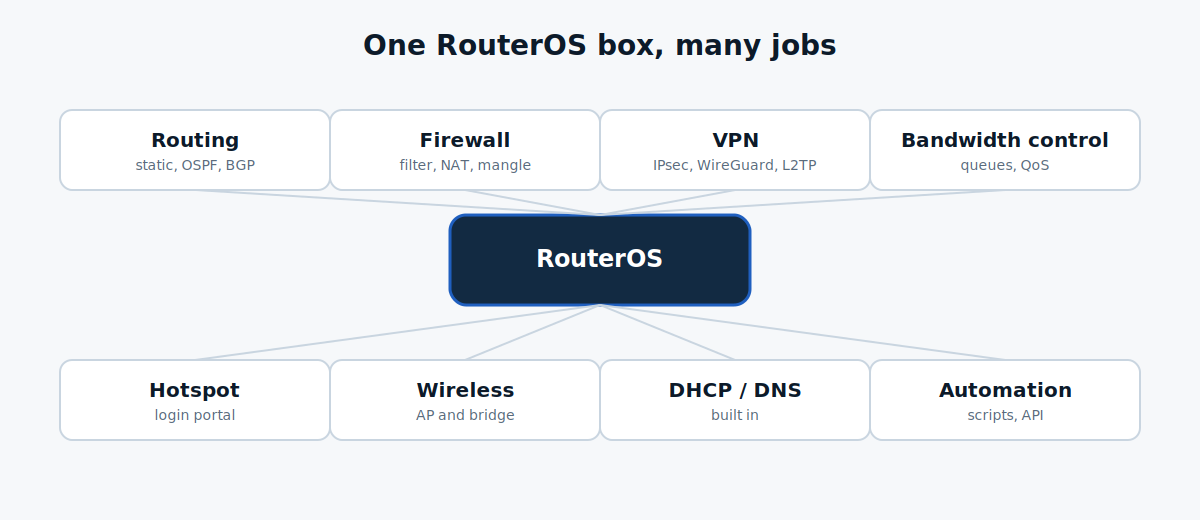
RouterOS includes advanced features out of the box: routing protocols such as OSPF and BGP, a stateful firewall, NAT, VPN, bandwidth control, hotspot and more. Many vendors charge extra for these or put them behind subscriptions.
3. Very flexible
You decide how the router behaves. You can build anything from a simple home gateway to a multi-uplink router with load balancing and failover. The same OS runs on a tiny router and on a large one, so the skills you learn carry over.
4. WinBox and the command line
You can manage the router with the WinBox graphical tool, a web page (WebFig), or the command line over SSH. WinBox can even connect by MAC address when the router has no IP yet. This is a real help when you are recovering from a mistake.
5. Scripting and automation
RouterOS has its own scripting language and an API, so you can automate tasks such as creating customer accounts, scheduling backups or reacting to events.
6. Active community and training
There is a large community on the MikroTik forum, plus public documentation. MikroTik also offers training and certifications, starting with **MTCNA** (MikroTik Certified Network Associate).
7. Simple licensing
Every device includes a RouterOS licence level. Higher levels unlock more capacity, such as the number of tunnels or users. You do not pay a yearly fee for the software on a physical device.
Who uses MikroTik?
– Small and medium ISPs and WISPs, who use it to deliver internet to customers
– Offices and businesses, for firewalls, VPNs and multiple internet lines
– Hotels, cafc and campuses, for hotspot and guest Wi-Fi
– Home labs and students, to practise real networking at a low cost
It is especially popular in countries where budgets are tight and there are many local ISPs, including Bangladesh.
MikroTik vs. a Normal Home Router
A typical home router is designed for simple, everyday internet use, while MikroTik offers more advanced networking features and greater control over network traffic. Here is a comparison you can add directly to your WordPress blog.
| Feature | Typical Home Router | MikroTik Router |
|---|---|---|
| Setup | Simple setup wizard or web interface | More configuration options and a steeper learning curve |
| Features | Basic Wi-Fi, NAT, DHCP, and firewall | Advanced routing, firewall, VPN, QoS, VLANs, and traffic management |
| Network Control | Limited customization | Extensive control over network settings and traffic |
| Security | Basic security features, depending on the model | Advanced firewall rules, access controls, and VPN configuration |
| Bandwidth Management | Basic bandwidth controls on some models | Flexible bandwidth management and traffic shaping |
| Routing | Basic routing for home networks | Static routing, dynamic routing protocols, and policy-based routing, depending on the configuration |
| Learning Curve | Easy for beginners | Medium to advanced |
| Best For | Homes and everyday internet users | ISPs, offices, network administrators, and networking students |
| Operating System | Varies by manufacturer | RouterOS |
| Management Tools | Manufacturer’s app or web interface | WinBox, WebFig, CLI, and other supported management tools |
Downsides to know about
MikroTik is not perfect, and you should be honest about this before choosing it.
– Learning curve.The freedom comes with complexity. A wrong firewall rule can lock you out.
– Default setup is not “set and forget”.You should secure it yourself.
– Security needs attention. Like any router, MikroTik has had security vulnerabilities in the past. Keep RouterOS updated, use a strong password, and do not leave management ports open to the internet.
– Support is mostly community-based. There is documentation and a forum, but not the same hand-holding as some enterprise vendors.
How to Start Learning MikroTik: A Beginner’s Guide
Learning MikroTik is a great way to build networking skills for a career in IT, network administration, or Internet Service Provider (ISP) operations. Follow these steps to learn MikroTik from the basics to more advanced networking concepts.
1. Get a MikroTik Router or Start with CHR
You can begin learning MikroTik in two ways:
- Physical Router: Purchase an entry-level MikroTik router to practise on real hardware.
- MikroTik CHR (Cloud Hosted Router): Install CHR in a virtual machine using software such as VirtualBox or VMware to practise RouterOS in a virtual environment.
CHR is an excellent option for beginners who want to learn without purchasing a physical router. Check the licensing and performance limitations before using it for anything beyond basic practice.
2. Learn How to Configure MikroTik with WinBox
WinBox is a graphical management tool that makes it easier to configure and manage MikroTik routers.
Start by learning how to:
- Connect to a MikroTik router.
- Access RouterOS through WinBox.
- Configure interfaces and IP addresses.
- Set up internet connectivity.
- Save and back up your configuration.
Read our beginner’s tutorial: MikroTik for Beginners: Your First Router Setup with WinBox.
3. Read the Official MikroTik Documentation
The official documentation provides detailed explanations of RouterOS features, configuration options, and troubleshooting techniques.
Visit the official MikroTik documentation to explore the RouterOS manuals and configuration guides.
4. Practise Networking Topics in the Right Order
Follow this learning path to build your knowledge step by step.
| Level | Topic | What You Will Learn |
|---|---|---|
| Beginner | IP Addressing and Subnetting | IP addresses, subnet masks, and gateways |
| Beginner | DHCP | Automatically assigning IP addresses |
| Beginner | NAT | Sharing an internet connection |
| Intermediate | Firewall | Protecting networks and controlling traffic |
| Intermediate | VLANs | Separating devices into logical networks |
| Intermediate | VPN | Creating secure connections between networks |
| Advanced | Routing | Static routes and dynamic routing protocols |
| Advanced | Bandwidth Management | Managing internet speeds and traffic priorities |
| Advanced | Network Troubleshooting | Diagnosing and resolving network problems |
Tip: Practise each topic in a test environment before applying changes to a live network.
5. Consider the MTCNA Certification
The MikroTik Certified Network Associate (MTCNA) certification is a useful starting point for people who want to demonstrate their understanding of MikroTik networking.
Before pursuing the certification, become comfortable with basic IP networking, RouterOS configuration, DHCP, NAT, firewall fundamentals, and routing.
You can explore training and certification information through the official MikroTik website.
## Frequently asked questions
Is MikroTik good for beginners?
Yes, if you want to learn networking. It is not the easiest for a user who only wants plug-and-play Wi-Fi.
Is MikroTik free?
The devices cost money, but RouterOS comes preinstalled with a licence. CHR can be tried for free with limited speed.
Is MikroTik secure?
It can be, if you update it and configure the firewall properly. Most problems come from default settings and exposed management ports.
What does a MikroTik run?
RouterOS, the company’s own operating system based on Linux.
## Summary
MikroTik is a Latvian company founded in 1996. It created RouterOS in 1997 and its own RouterBOARD hardware in 2002. People use it because it offers advanced routing, firewall, VPN and bandwidth control at a low price, with a lot of flexibility. The trade-off is a steeper learning curve and the need to secure it yourself.
If you want to learn real networking, MikroTik is one of the best places to start.
Leave a Reply